Showing posts with label Windows Software. Show all posts

Sunday, October 4, 2009

Here are a few links to apps I use on a regular basis (and a couple that are new to me). 'Mr. Modem' (aka Richard Sherman) promotes these in his column in the Fall 2009 issue of Smart Computing.

Firefox - if you're a Windows user and you're still using Internet Explorer, then you probably just don't know any better and really can't be blamed for your ignorance (in the non pejorative sense of the word of course). IE is a piece of crap. It's ugly, slow, and full of security holes. Microsoft refuses to comply with standards, and it makes the life of web developers a royal pain in the butt. Case in point, Google just came out with an add-on/plug-in, Google Chrome Frame, for IE that by-passes the 'guts' of IE and 'replaces' it with Google code, thereby eliminating the issues of web developers. This all came about because Google is coming out with 'Wave', and IE is not up to the task. With this 'add-on' web developers can now skip coding for IE, and just place a download link on their site, and IE users can then install the add-on to get the site to work properly. You've gotta love Google.

(old pic from Wikipedia)

Foxit Reader - why would anyone need a PDF reader when Adobe's Reader is free, and everyone who's ever needed to read a PDF document has probably already downloaded and installed it? Well, for starters, Reader is quite a big download. And on top of that it's slow and bloated. Foxit Reader is small, fast, and best of all it works (and it's also free).


Google Docs - Microsoft did a good job of cornering the market on Office apps long ago. When people get a new computer, one of the first extra programs they think they need to buy (that is, if it doesn't come default, or if you didn't choose to add it to your online shopping cart) is MS Office. We need to step back and realize that lock-in is a very bad thing. Choice is where it's at. Most MS Office formats can be accessed in other free programs, so there's no good reason not to try them out. If they work for you, great. If not, you're not out anything but time (which isn't necessarily insignifcant). If you already have a gmail account, you really have no excuse not to try out Google Docs. It's free, and you can access it from any web-connected computer.


OpenOffice - this is another free alternative to MS Office. Instead of being an online app, it's a download/install app. It's a bit of a big download (and some would argue bloated, much like MS Office) but it works great, and it's free. I use it on regular basis and love it.


Thunderbird - this is a desktop email app (download/install). I have multiple email accounts and I've configured Thunderbird to pull in my email from all of these accounts. I open Thuderbird and all of my email accounts are there. I can access all of my emails from one location. Even without being online I can see every email I've saved to my laptop. I can even write emails to be mailed once I'm back online. Thunderbird, along with Firefox, are the 2 big open source programs that got me into Linux.


Now, if you're a Windows user, security is a serious problem that can't be overlooked. My number one suggestion is to switch to Linux, or, if you're loaded (and not very techie) buy a Mac. But if you're stubborn and entrenched in the world of Windows, here are a few apps to check out.

Malwarebytes - According to Mr. Modem it "detects and removes malware other anti-malware programs often miss". There's a free version and a paid version (one time $24.95 licensing fee). I've never used this, but I've been hearing good things about it recently and if Mr. Modem recommends it, that says a lot.


Moon Secure (Beta) - This free anti-virus program is another app I've never used, that Mr. Modem recommends. If you're a Windows user, you really need an anti-virus program. There are a lot of good free apps out there, and if a techie I trust recommends something, that says a lot to me.


Now, here's something extra just for fun: Foodgawker


Be productive. Be safe. Enjoy!

Tuesday, June 2, 2009

Magazine highlights: Maximum PC July 2009

I subscribe to a number of PC & Linux magazines and each month I usually pick up a few more magazines from Borders or Barnes & Noble, that I don't subscribe to. As I read thru them, I always fold over the corner on a page that has something of interest to me, and put an asterisk next to it if there's a lot on the page. Once I finish going thru the magazine, I go back and collect all of the notes I've taken, and take notes, bookmark, or whatever. It's all really good stuff and I've been wanting a better way to hold onto this stuff, and then it came to me. I'm always looking for stuff to blog about, why not combine the two and blog about the magazines I read. People are always reviewing books, why not magazines. I'm not sure if it's ever been done before, but it could be a good service for people. They won't have to buy the magazine, nor read them. And I too can benefit, since my notes will be collected here, in easy to read blog form.

I'll try this for a bit, and see how it goes.

So, first up is Maximum PC, July 2009. I got it just a few days ago, and zipped thru it in about 3 days or so. After I finished, I sat down with the magazine at the computer and typed up these notes. Then I cut and pasted those notes here, and went thru them cleaning them up a bit.

So here we go.

In Windows XP, it seems to me that the 'Add/Remove Programs' (what a misnomer) has been a piece of $*#&! for years. Even the 'Uninstall' programs that come with most quality software is hit or miss; sometimes they uninstall and clean up quite nicely, and other times they royally muck things up. For a while now I've been hearing great things about a free alternative, 'Revo Uninstaller' (http://www.revouninstaller.com) and I've been wanting to try it out. Apparently it works magic with those hard to remove apps. The next time I need to remove something in Windows XP, I'm using Revo Uninstaller (and I'll do a write up about my experiences when I do).


Secunia's Personal Software Inspector (http://secunia.com) takes an inventory of your non-MS apps, and keeps you informed of what needs patching and how to go about getting those all important patches.


Phoenix Technologies' DriverAgent (http://driveragent.com) is a web-based app that scans your current hardware, and lets you know, which devices have updated firmware that you may want to get your hands on. If you're willing to fork over some $$, they'll be more than happy to serve those updates to you, but I'd just take a few screenshots, or print out the page, and then I'd go a-hunting for the needed firmware.


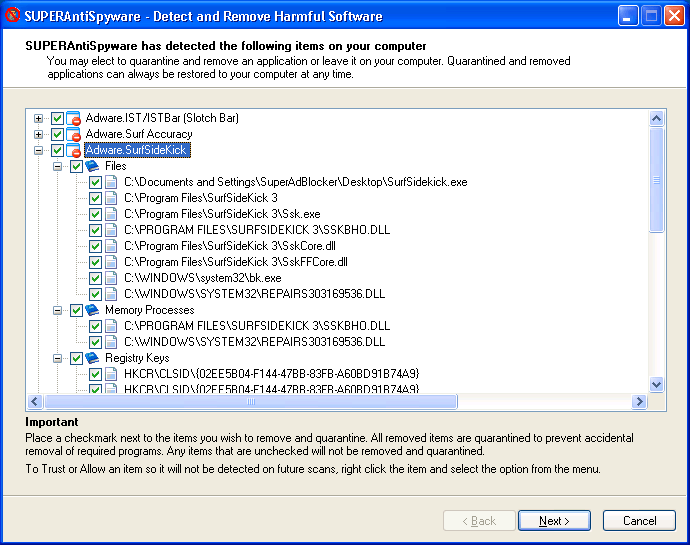
Now here are 3 Malware apps that might come in handy, SuperAntiSpyware (http://www.superantispyware.com) install then run it and remove what it tells you to, Malwarebytes Anti-Malware (http://www.malwarebytes.org) same goes for this one, and Panda Activescan 2.0 (http://www.pandasecurity.com/activescan/index) which is a web-based scanner and won't fix anything for you just informs.


Here's an application I've used before, and it's one to keep in your tech toolbox. PC Decrapifier (http://www.pcdecrapifier.com). When you get a Windows PC there's often a lot of programs/trialware installed that you don't want and will never use and for a whole host of reasons its prudent to zap these buggers ASAP. That's where PC Decrapifier really shines. Believe me, I've used it, I love it, I highly recommend it, and I'm sure you'll love it too.


Tons of apps and services start up when you turn on your Windows pc, and R2 Studios' Startup Delayer (http://www.r2.com.au) enables you to be in charge of what runs, and in what order, and if there's any delays required (or desired). I know how frustrating it can be sometimes when you turn on your computer to check on something quickly, but you end up waiting forever for the startup services/apps to relinquish cpu cycles and RAM so that you can get on with whatever it is that you're trying to accomplish. This program is designed to help soften the emotional blow of this kind of situation.


Every Windows pc needs a good defrag once in a while (monthly perhaps) and the free app that MS supplies just isn't up to snuff. Diskeeper 2009 (http://www.diskeeper.com) steps in to do what the MS app can't/won't.


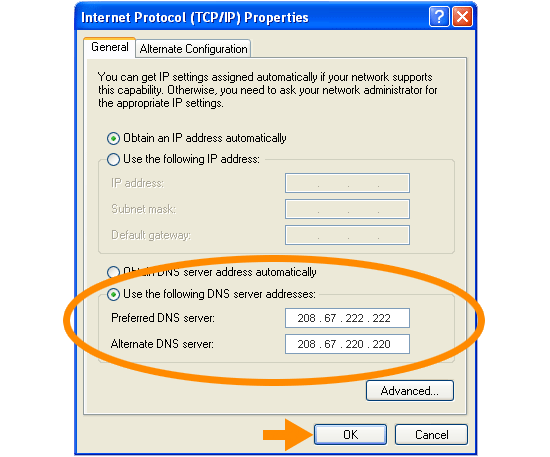
You may want to consider switching from the DNS service your ISP provides to OpenDNS (http://www.opendns.com/).


And if you want a better way to tweak those hidden settings in Firefox, check out Firetune (http://www.totalidea.com/download.php).


Well, overall it was a great Maximun PC magazine for the month of July 2009.